- History and trade-offs with UUIDs
- What kinds of improvements did we see?
- Auditing where the UUIDs came from
- How did the switch go?
- Bringing in the big retry machinery
- Actively cancelling lock-holding queries
- Downsides of uuid v7
- Wrap Up
🤠 🗽 This September and October I'll be in Austin, TX and NYC, check my Book page for upcoming appearances. Thanks to Aura for sponsoring these trips.
Aura frames are beautifully designed digital photo frames that help people stay connected to the moments that matter.
Join our team and help build the products and infrastructure behind Aura. Explore open roles across engineering, product, mobile, and more.
We recently switched to version 7 (v7) uuid primary keys and saw significantly faster inserts for some tables.
The databases were running Postgres 18.4 and mostly used v1 with some v4 uuid values for primary keys.
Changing the column default involved running a single alter table command, but did require an exclusive lock on the table, blocking everything including selects.
To solve that, we used a short lock timeout and lots of retries.
The biggest speedup was 23x faster average execution time for a multi-row insert query called 12,000 times per minute on a table with billions of rows.
History and trade-offs with UUIDs
The system uses UUID primary keys throughout. I typically recommend starting with bigint and sequences over UUID v4 primary keys, although here uuid v1 was used. Insert performance is not as bad for v1 compared with v4.
Still though, v7 brings better performance than both for inserts and can also result in smaller indexes with fewer page splits meaning less CPU and IO.
What drives bad performance for v4 and to a lesser extent v1? Let’s do a quick refresher. As new table rows are inserted and a primary key is defined, primary key values are maintained in sorted order in a b-tree index. Just like table rows, index entries in Postgres are stored in fixed size 8kb pages.
Postgres needs to know in which page to place the new index entry. For sorted order, the first bytes of new uuid values are compared.
For v4 given new values are very random and not monotonically increasing (they lack “monotonicity”), values can be earlier or later, meaning they’re unlikely to be placed into the same recently accessed page. This is bad for caching!
When new values are monotonically increasing, the recently accessed page is “hot” in the Postgres buffer cache (in memory copy of the on-disk page).
When Postgres is not able to use the hot index page for the newly inserted value, that page could be outside the buffer cache, not in the OS cache, and ultimately result in a much slower disk read which increases latency.
Besides the worse insert performance, since v4 values are scattered to more pages, this means there are more “page splits” when new inserts are attempted in full pages. Page splits cause more latency from increase WAL and IO.
We experimented and benchmarked with v1, v4, and v7 uuid formats and we leveraged the research and write-ups from external sources like the ones below.
- How Sequential UUIDv7 Boosts Ingestion Performance
- Simplicity and power of UUID v7
- PostgreSQL UUID Performance: Benchmarking Random (v4) and Time-based (v7) UUIDs
Benchmarks are great, but what kind of real world results did we see?
What kinds of improvements did we see?
We decided to make this the new default unless v4 was needed for more randomness. After all qualified tables were changed, I began going through insert queries for each changed table. For many of the tables, there wasn’t an obvious change.
However, for a handful we saw an immediate and significant improvement. I picked 5 with speedups of 6x, 8x, 9x, 20x, and 23x.
The PgAnalyze graphs for the 23x, 9x, and 6x queries are shown below.
| Calls/min | Indexes | Original time | New | Reduction | |
|---|---|---|---|---|---|
| Table A | 12,000 | 2 (+1 PK) | 0.7ms | 0.03ms | 📉 23x |
| Table B | 2000 | 1 (+1 PK) | 0.6ms | 0.07ms | 📉 9x |
| Table C | 9500 | 2 (+1 PK) | 0.50ms | 0.08ms | 📉 6x |
Showing PgAnalyze insert query graphs for tables A, B, C:
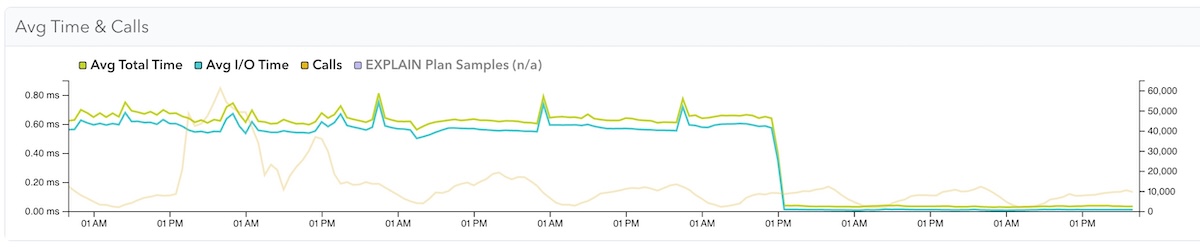
Table A - 23x reduction. 0.7ms to 0.03ms, 12000 calls/min
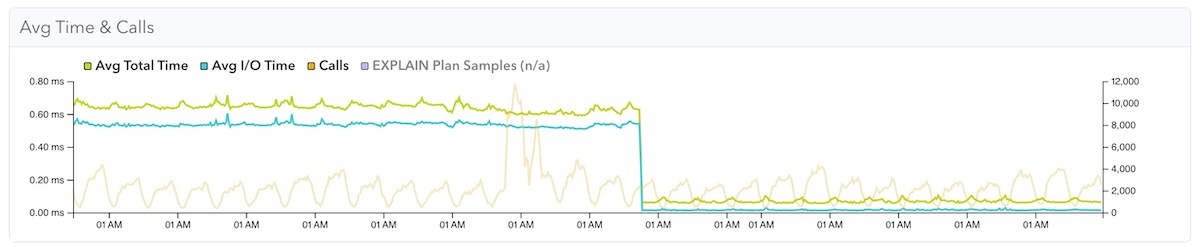
Table B - 9x reduction. 0.6ms to 0.07ms, 2000 calls/min

Table C - 6x reduction. 0.50ms to 0.08ms, 9500 calls/min
Now that we’ve seen the results, let’s talk about how this was done and the challenges.
Auditing where the UUIDs came from
The UUID values came from various sources:
- The
uuid_generate_v1()function from theuuid-osspmodule - The function
gen_random_uuid()added in Postgres 13 that generates v4 UUIDs natively - UUID v4 values sent by a client application, which meant the column default function was not used
We replaced most of these with the uuidv7() function in Postgres 18. To do that, we needed to run a single alter table ... alter column statement per table.
The statement ran fast, so no problem, right?
How did the switch go?
One wrinkle we found was that modifying the column default while fast, required an access exclusive lock.
This lock type conflicts with every read and write operation including regular select statements.
For our highest queried tables, they’re queried constantly, so this was a problem. There was almost never a “window” to perform this operation, and we didn’t want to take downtime for this switch.
While heavily queried tables were a challenge, infrequently queried tables did not pose a problem for this alter table statement at all.
For those, we could use our migrations framework (Active Record in Ruby on Rails) and perform the alter table using a regular old migration.
For those, we did add some safeguards, by creating an explicit transaction and using set local to control timeout values. We’d set short timeouts for the alter table to give up quickly if it didn’t work or ran too long.
From psql:
BEGIN;

SET LOCAL lock_timeout = '50ms';
SET LOCAL statement_timeout = '100ms';

ALTER TABLE my_table ALTER COLUMN id SET DEFAULT uuidv7();

COMMIT;
For the higher activity tables, we’d need some retries. We’d use a manual psql session:
SET lock_timeout = '50ms';
SET statement_timeout = '100ms';
ALTER TABLE my_table ALTER COLUMN id SET DEFAULT uuidv7();
The alter table would commit if it grabbed the lock within 50ms, or we’d get an error that the lock_timeout was reached.
The benefit of the manual approach was we could retry until successful and backfill a Rails migration to keep everything in sync. A more sophisticated solution might have automated retries within Ruby.
However, for our most heavily queried tables, we wanted even more control over the retries.
How did we do that?
Bringing in the big retry machinery
Sometimes one or two retries would do the job. Great, we’d move on.
However, for our most heavily queried table that didn’t work.
What ended up working was using the same strategy of retries, but just adding more sophistication with looping and backoffs.
Claude helped me cook up the PL/pgSQL looping retry function below, I did some testing and was ready to try it. It has these features:
- Try up to 50 times (max attempts is configurable)
- Add a pause in between retries, with a jittered backoff of 50-250ms
From psql:
SET statement_timeout = 0;
SET lock_timeout = '100ms';

DO $$
DECLARE
  attempt      INT := 0;
  max_attempts INT := 50;
BEGIN
  LOOP
    attempt := attempt + 1;
      BEGIN
        EXECUTE 'ALTER TABLE my_table ALTER COLUMN id SET DEFAULT uuidv7()';
        RAISE NOTICE 'Succeeded on attempt %', attempt;
        EXIT;
      EXCEPTION WHEN lock_not_available THEN
        IF attempt >= max_attempts THEN
          RAISE EXCEPTION 'Failed to acquire lock after % attempts', attempt;
        END IF;
      PERFORM pg_sleep(0.05 + random() * 0.2);  -- jittered backoff, 50-250ms
    END;
  END LOOP;
END $$;
By using the function above, we were able to find a small window to perform the alter table after several dozen quick retries!
Actively cancelling lock-holding queries
In cases where even many retries won’t work, and we don’t want downtime, we may be left with needing to actively monitor lock holder queries and to cancel them (assuming that’s ok).
Thanks to Ants Aasma from the community PostgreSQL Slack for this idea.
We didn’t end up needing to do this, but here was my prep for this. It’s still useful to review lock holder queries.
First we’d inspect live queries:
SELECT
  pid, state, left(query,100), xact_start, state_change,
  age(clock_timestamp(), xact_start) AS tx_duration
FROM
  pg_stat_activity
WHERE
  state != 'idle'
ORDER BY xact_start;
And identify queries holding locks:
SELECT
  blocked_locks.pid AS blocked_pid,
  blocking_locks.pid AS blocking_pid,
  blocked_activity.query AS blocked_statement,
  blocking_activity.query AS current_statement_in_blocking_process
FROM
  pg_catalog.pg_locks blocked_locks
JOIN
  pg_catalog.pg_stat_activity blocked_activity
  ON blocked_activity.pid = blocked_locks.pid
JOIN pg_catalog.pg_locks blocking_locks
  ON blocking_locks.locktype = blocked_locks.locktype
  AND blocking_locks.relation IS NOT DISTINCT FROM blocked_locks.relation
  AND blocking_locks.pid != blocked_locks.pid
JOIN pg_catalog.pg_stat_activity blocking_activity
  ON blocking_activity.pid = blocking_locks.pid
WHERE NOT blocked_locks.granted;
If we find them, we could cancel them to create a window to run our alter table. That could mean bad user experience so you’d need to figure that out for your database.
SELECT pg_cancel_backend(blocking_pid);
We’d likely want to stack up our alter table operation to occur immediately after. Fortunately we didn’t end up needing to do this, but I’d be interested to hear the stories from others with heavily queried databases.
Downsides of uuid v7
Since uuid v7 values use a timestamp in their first bits, this timestamp can be easily decoded. This can be viewed as “leaking” or exposing the creation time of the record via that timestamp, which could be a downside for your database. You’ll have to decide that. v4 UUIDs do not expose the creation time.
Wrap Up
We found some significant speedups for insert queries after switching to uuidv7() primary keys, for a relatively low effort change. A nice ROI.
The only wrinkle was the exclusive lock alter table ... alter column required, but we solved that with short lock related timeouts and many retries.
Although this didn’t benefit 100% of our tables, the gains for some were significant and uuid v7 has become our new default choice for uuid primary keys.
Thanks to the Postgres core team for creating this new capability within Postgres. The availability in core made it possible to adopt on AWS RDS which supports a limited amount of extensions.
Thanks for reading, and until next time.